Quick Tip #87 - Drag-n-drop team building and much more
Here's a roundup of features that we've added recently to make your life easier.
If you work with youth teams, you often have the challenge of dividing a large group of kids into
fair teams organized by age and skill level while trying to accommodate school and friend requests.
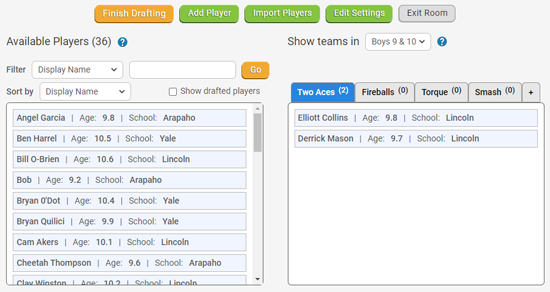
So QuickScores added a new drag-n-drop Team Building feature that lets you see
that important organizing info while moving players onto teams.
|

|
Team Building
After creating your leagues and teams, go to Tools > Rosters and
click on the new Team Building button. There is a help section that describes how to create a draft room and
use one of the four different ways to import players into the room. You can then get down to business dragging players
onto their teams using the filtering criteria you've laid out.
|

|
Auto-Invite Coaches
On Setup > Main Setup > When to Invite Coaches, we allow you to
specify when you want to invite coaches to register with QuickScores. We just added a third option -
When Coach is Added. With this option, we'll send an invitation email to coaches as soon as you
add them me to a team (instead of waiting for the league to be public).
|

|
Pickleball Scoresheets
If you run pickleball leagues or tournaments, you'll be happy to know we've added two scoresheets for that sport.
The landscape sheet is for a single match, and the portrait version is for two matches.
|

|
Archive Events
After you have run a large number of leagues or tournaments on QuickScores, you may want to retain all coach and player
info, but you don't want the older events cluttering up your list of current events. We've added the ability
to archive old events, which hides them from your regular league list, but doesn't delete them.
On the Manage Events page, you can:
• Use the new Archive checkbox to archive an event
• Click the green View Archives button to switch to Archive Mode
• Use the Unarchive checkbox to make any event current again
Under Setup > Main Setup > Archive League Options, you can set an "Auto-Archive"
timeline and we will automatically archive events after they are a certain number of years old. You can also do a one-time
archive of all events older than a particular date.
|

|
Max Entries per Event when Registering
When designing an online registration form, you've always been able to set the max number of
entries that will be accepted for that form. When that max is reached, no more registrations are accepted.
We have now extended the Max Entries concept to the League List selector field. Now, when you edit a League List dropdown
field on a registration form, each league has a separate Max Entries limit. This will allow you to consolidate a season's worth
of registration forms into a single form while still being able to limit how many people can sign up for each league.
|

|
Photos of Officials
You can now upload pictures of officials on their Edit Official pages. These pictures are
strictly for your administrative use and are not shown to coaches or the public.
|

|
Ranking Officials
On the Game Officials page, we changed the rank field from integer to alphanumeric. So now you can assign ranks like JR, SR, or P-1
in addition to simple numeric ranks.
|
From the QuickScores staff,
...dedicated to making your life just a little easier
Click here for the Quick Tips archive

|
Tim Quilici, Chief Innovation Officer
214-450-3079 / tim@quickscores.com
1303 Cheyenne Drive, Richardson, TX 75080
|
|
