|
When looking at your schedules, have you ever thought, “Gosh, it sure would be great if I could just
click and drag this game to a new time or location.”
Well, we read your mind and are excited to release our coolest feature in years:
Drag ‘n Drop Editing!
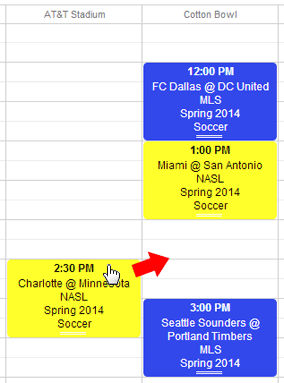
Using the same software as Google Calendar, you can now view multiple schedules at once AND edit the
games by simply dragging the color coded game boxes to their new day, time, or location!
Don’t want to drag and drop? Just double-click on a game box and a pop-up window will let you edit the
same details that are on the Edit Schedule page.
Just click on Drag ‘n Drop Editing in the left-hand menu (underneath Edit Schedule) and
give it a whirl. This feature is pretty intuitive, but we’ve still included a
help page
to fill you in on all the details.
|