QuickScores Quick Tip #29 - The Spotlight is on Brackets!
|
Here are some new features that our friends have been asking for. They all relate to brackets and there’s probably something here for
anyone that runs tournaments or playoffs.
The first feature works automatically for you. Whenever you enter the Modify Schedule page, the software will analyze all bracket
games with dates and times and warn you if the games are out of order or too close together.
|
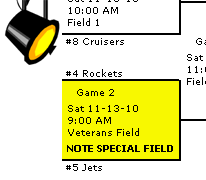
The second feature is the addition of a new button - GAME COMMENTS - on the Modify Schedule page for brackets. By clicking that button,
you can highlight a game or add comments just like on regular season games!
Lastly, we have added the ability to automatically assign a group of games to multiple fields across a set of time slots. The GAME QUICKSET feature
is accessed by clicking the blue ADVANCED OPTIONS button on the Modify Schedule page for any bracket. Once there, you can select the game numbers
that you want to set the dates, times and locations. Set the date and time for the first game, set the INTERVAL (the time between the start of games)
and select the locations you want to assign games too. Yes, that is LOCATIONS. Now you can select more than one location by using the CONTROL key.
Select as many as you want, and QuickScores will intelligently assign dates, times and locations to your brackets, adjusting the times as needed to
produce a playable bracket.
From the QuickScores staff,
...dedicated to making your life just a little easier
Click here for the Quick Tips archive

|
Tim Quilici, QuickScores President
214-450-3079 / tim@quickscores.com
1501 Montclair Drive, Richardson, TX 75081
|
|