Quick Tip #26 - Post Scores for All Leagues with Fewer Clicks
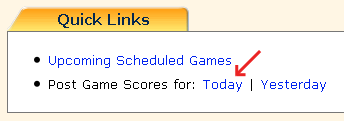
After logging in to your Admin Home page, click on the TODAY or YESTERDAY link next to "Post Game Scores For" in the QUICK LINKS section. This displays a list of all games that were played on the day selected. You can also navigate to your schedule by using the NEXT or PREVIOUS day links or go directly to a specific date by typing the date or using the calendar and clicking GO!
Once the games are dispayed for your desired day, you can enter scores and comments or specify highlighting just like you do on any league’s POST SCORES page. If desired, there are links to jump between the POST SCORES FOR A DAY page and the POST SCORES FOR A LEAGUE pages. What could be easier and more efficient!
From the QuickScores staff,
|


| You received this email because you are believed to be a hands-on user of QuickScores.com that might be interested in learning how to use the website more efficiently. If you do not wish to receive any further email from QuickScores, simply reply to this email, state your request, and you won't hear from us again. |